
Author: adm1233dasd
Adaptive Hybrid System 78.10 – Multi-Core VISUAL MODE
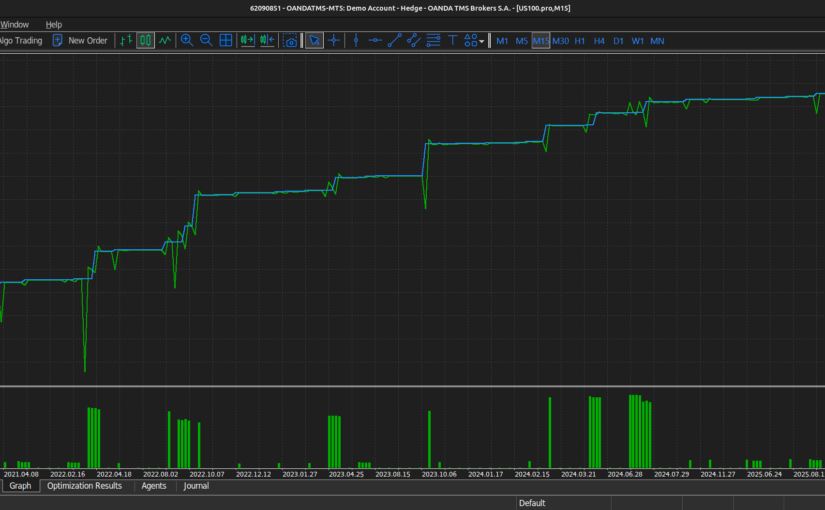
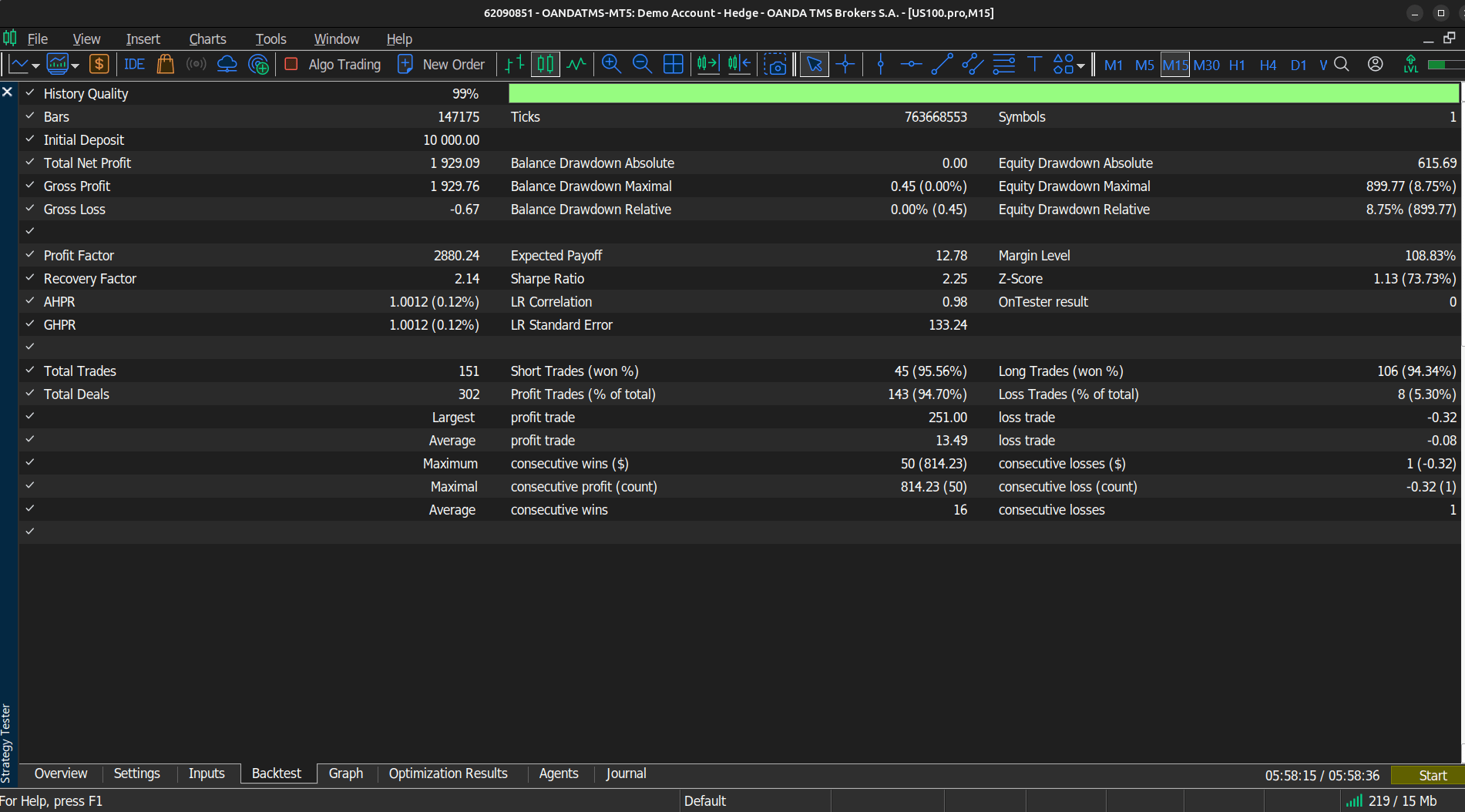
Strategy Tester Report – M15 (2020.01.01 – 2026.04.23) 1:20
| Expert: | AHS_Main | |||||||||||
| Symbol: | US100.pro | |||||||||||
| Period: | M15 (2020.01.01 – 2026.04.23) | |||||||||||
| Company: | OANDA TMS Brokers S.A. | |||||||||||
| Currency: | USD | |||||||||||
| Initial Deposit: | 10 000.00 | |||||||||||
| Leverage: | 1:20 | |||||||||||
SET
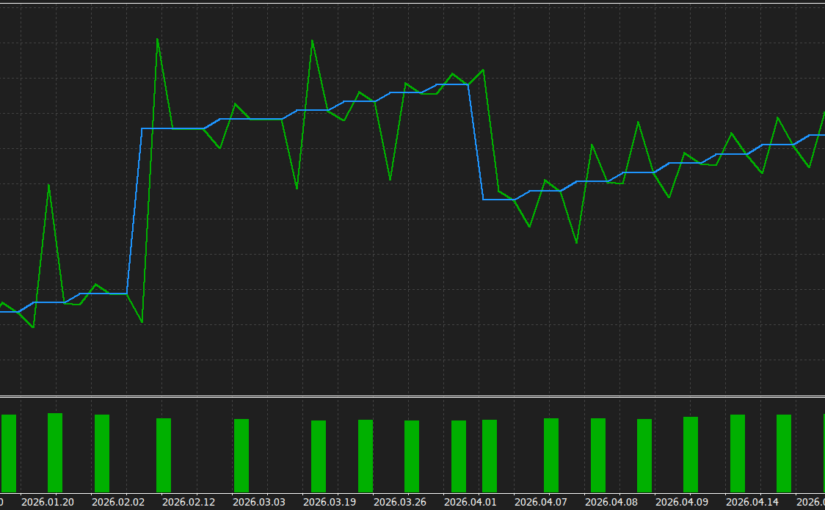
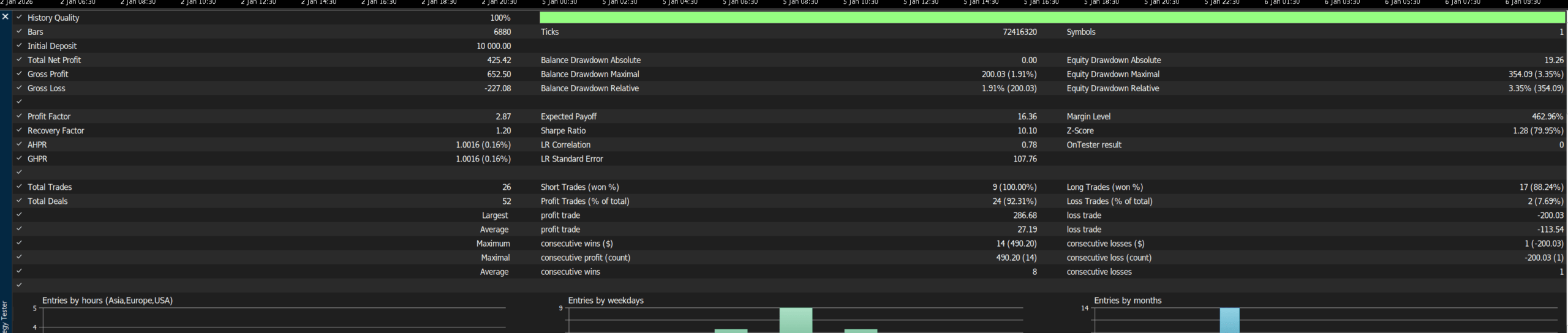
Strategy Tester Report 2026.01.01 – 2026.04.19 – 1:100
| Expert: | AHS_Main | |||||||||||
| Symbol: | US100.pro | |||||||||||
| Period: | M15 (2026.01.01 – 2026.04.19) | |||||||||||
| Company: | OANDA TMS Brokers S.A. | |||||||||||
| Currency: | USD | |||||||||||
| Initial Deposit: | 10 000.00 | |||||||||||
| Leverage: | 1:100 | |||||||||||
SET
System Philosophy — Summary
System Philosophy — Summary
AHS is not a simple EA with a single strategy. It is a hybrid risk management platform with an interchangeable strategy core, where:
- Every strategy can be a Trigger OR a Filter — the same logic serves both to generate signals and to validate them
- The Macro Risk Matrix looks at the broader market picture before permitting a trade — 19 global assets vote on every order
- The system reacts to impulses — when it detects a violent move, it radically changes its parameters, becoming more selective and directional
- Multi-layer protection — from the individual position level (Virtual SL, Hard BE, TSL BB, Profit Lock, Neg BE) through the daily level (Daily Loss, Daily Target) to the full account level (Equity TSL)
- Click & Forget — the trader can trade manually and the EA automatically takes over risk management for every open position
Full Input Parameter Reference
17. Full Input Parameter Reference
GLOBAL SETTINGS
| Parameter | Default | Description |
|---|---|---|
Inp_MagicNumberEA Magic Number | 7000001 | Unique EA identifier. Must differ for each chart/symbol on the same account |
Inp_MaxTotalPositionsMax Allowed Positions | 10 | Maximum number of simultaneously open positions on the symbol |
Inp_Cooldown_SecondsCooldown after Open/Close (sec) | 60 | Pause (in seconds) after opening or closing an order. Prevents over-trading |
Inp_Manage_Manual_TradesManage Manual Trades (Magic = 0) | true | When true, EA manages manually opened positions (Magic = 0) |
CAPITAL MANAGEMENT (RISK)
| Parameter | Default | Description |
|---|---|---|
Inp_Capital_ModeLot Calculation Mode | CAPITAL_COMPOUND_AUTO | Capital base calculation mode: AUTO (balance) or FIXED (fixed amount) |
Inp_Compound_EnableEnable Compound Buffer (TXT) | true | Enables Compound Buffer — base = Fixed + accumulated profit from TXT |
Inp_Compound_FreqCompound Frequency | FREQ_WEEKLY | Buffer update frequency: Daily / Weekly / Monthly |
Inp_Fixed_Capital_AmountBase Amount (Manual Locked Base) | 10000.0 | Fixed base amount (used in FIXED mode or as Compound base) |
Inp_MaxTotalMarginPercentMax Margin Budget (%) | 100.0 | Max % of balance allocated to margin budget |
Inp_Risk_Percent_Per_TradeRisk per Trade (%) | 20.0 | % of budget risked per order (determines lot size via SL) |
Inp_Pyramid_MultiplierPyramid Multiplier (Probe -> Main) | 3.0 | Volume multiplier: probe (÷3) → main (×3) |
Inp_Pyramid_Max_LotsHard Cap: Max lots for any single position | 2.0 | Absolute lot cap for any single position |
Inp_Pyramid_OnlyProfitablePyramid only if last is in profit | true | Pyramid only when the last position is in profit |
ACCOUNT PROTECTION (LIMITS)
| Parameter | Default | Description |
|---|---|---|
Inp_Daily_Loss_HardLimitHARD STOP: Daily Loss Limit (%) | 4.0 | HARD STOP: % daily loss freezes new orders for the entire day |
Inp_Drawdown_FreezeLimitFREEZE: Max Drawdown Limit (%) | 0.5 | FREEZE: % current drawdown blocks new orders |
Inp_Daily_Target_ProfitFREEZE: Max Drawdown Limit (%) | 15.0 | TARGET: % daily profit stops trading (day considered a success) |
EQUITY TRAILING LOCK (MASTER)
| Parameter | Default | Description |
|---|---|---|
Inp_Equity_TSL_TriggerActivation Threshold (%) | 5.0 | % equity gain that activates the equity trailing lock |
Inp_Equity_TSL_BufferTrailing Distance (%) | 0.2 | % trailing distance — equity drops this much below its peak → close everything |
VIRTUAL STOP LOSS (ACCOUNT PROTECTION)
| Parameter | Default | Description |
|---|---|---|
Inp_Virtual_SL_PercentVirtual SL per Position (%) | 4.0 | Emergency close when position loss exceeds X% of active capital |
TRADING SCHEDULE (LOCAL TIME)
| Parameter | Default | Description |
|---|---|---|
Inp_Hours_MondayMonday Trading Hours | „00:00-22:00” | Monday trading window |
Inp_Hours_TuesdayTuesday Trading Hours | „00:00-22:00” | Tuesday trading window |
Inp_Hours_WednesdayWednesday Trading Hours | „00:00-22:00” | Wednesday trading window |
Inp_Hours_ThursdayThursday Trading Hours | „00:00-22:00” | Thursday trading window |
Inp_Hours_FridayFriday Trading Hours | „00:00-05:00” | Friday trading window (shorter — weekend risk) |
END OF DAY CLOSE (EOD)
| Parameter | Default | Description |
|---|---|---|
Inp_EOD_EnableEnable EOD Terminator | true | Enables the EOD Terminator |
Inp_EOD_Time_FridayFriday Kill Time (HH:MM) | „21:39” | Emergency close time on Fridays |
Inp_EOD_Time_OtherDaysOther Days Kill Time (HH:MM) | „22:29” | Emergency close time on other days |
NEWS FILTER
| Parameter | Default | Description |
|---|---|---|
Inp_News_Filter_EnableEnable News Filter (Freeze) | true | Enables the economic calendar filter |
Inp_News_Mins_BeforeFreeze X minutes BEFORE news | 30 | Minutes before news to freeze trading |
Inp_News_Mins_AfterFreeze X minutes AFTER news | 12 | Minutes after news to continue freeze |
Inp_News_Block_HighBlock on HIGH impact (Red) | true | Block on high-impact (red) news events |
Inp_News_Block_MidBlock on MID impact (Orange) | true | Block on medium-impact (orange) news events |
SMART DI MUZZLE MODE
| Parameter | Default | Description |
|---|---|---|
Inp_Muzzle_EnableEnable Muzzle Mode on Impulse | true | Enables Muzzle Mode on impulse detection |
Inp_Muzzle_Min_Candle_BodyMuzzle ON: Min Candle Body (Points) | 150 | Minimum candle body for Smart DI during an impulse (pts) |
Inp_Muzzle_CCI_Block_LevelMuzzle ON: CCI Block Level | 130.0 | Stricter CCI block threshold during an impulse |
Inp_Muzzle_Channel_Points_UpMuzzle ON: Upper Boundary (Points) | 5000 | Upper Muzzle Box boundary from impulse price (pts) |
Inp_Muzzle_Channel_Points_DownMuzzle ON: Lower Boundary (Points) 0 = BUY ONLY | 0 | Lower Muzzle Box boundary. 0 = BUY ONLY MODE |
INSTITUTIONAL IMPULSE
| Parameter | Default | Description |
|---|---|---|
Inp_Impulse_TFImpulse Timeframe | M1 | Timeframe for impulse detection |
Inp_Impulse_EnableEnable Impulse Detection | true | Enables impulse detection |
Inp_Impulse_VelocityVelocity Trigger | 0.005 | Price velocity threshold (0.5% close-to-close change) |
Inp_Impulse_RangeMultRange Multiplier vs Avg | 2.0 | Range multiplier vs. average (×2 = impulse) |
Inp_Impulse_ATRMultRange Multiplier vs ATR | 2.0 | Range multiplier vs. ATR (×2 = impulse) |
Inp_Impulse_VolMultVolume Multiplier vs Avg | 1.5 | Volume multiplier vs. average (×1.5 = impulse) |
Inp_Impulse_AvgPeriodPeriod for Averages | 20 | Period for calculating averages |
Inp_Impulse_Cooldown_MinsMuzzle Duration after Impulse (mins) | 15 | Minimum Muzzle Mode duration (minutes) |
Inp_Impulse_Min_Range_PointsMin Range to trigger Impulse (Points) | 50 | Minimum candle range before impulse checks are run (pts) |
BOX TRADING (DYNAMIC CHANNEL)
| Parameter | Default | Description |
|---|---|---|
Inp_Channel_EnableEnable Box Trading | true | Enables the dynamic price tunnel |
Inp_Channel_Update_HoursChannel Update Frequency (Hours) | 6 | How often the channel anchor is refreshed (hours) |
Inp_Channel_Points_UpUpper Boundary (Points) | 20000 | Upper boundary distance from anchor (pts) |
Inp_Channel_Points_DownLower Boundary (Points) | 5000 | Lower boundary distance from anchor (pts) |
MACRO RISK MATRIX
| Parameter | Default | Description |
|---|---|---|
Inp_Macro_TFMacro Timeframe | H1 | Timeframe for macro asset analysis |
Inp_Macro_EnableEnable Macro Matrix | true | Enables the Macro Risk Matrix |
Inp_Macro_Min_Alignment_PercentRequired Alignment (%) [Realistic Value] | 70.0 | Required % alignment to permit an order |
For each of the 19 assets (AAPL, MSFT, NVDA, AMZN, META, GOOGL, TSLA, AVGO, COST, NFLX, PEP, CSCO, TMUS, ADBE, AMD, BTC, GOLD, EURUSD, AUDJPY):
| Parameter | Description |
|---|---|
Inp_Macro_Use_XXXX | bool — Include / exclude asset from the matrix |
Inp_Macro_Sym_XXXX | string — Symbol name at your broker (e.g. „AAPL_CFD.US”) |
Inp_Macro_Weight_XXXX | double — Base weight (%) in the scoring pool |
HARD BLOCKS (RSI & CCI)
| Parameter | Default | Description |
|---|---|---|
Inp_Block_EnableEnable RSI & CCI Blocks (ON/OFF) | false | Enables hard RSI and CCI blocks |
Inp_Block_TFTimeframe for Hard Blocks | M15 | Timeframe for hard blocks |
Inp_Block_RSI_MaxBlock BUY if RSI > X | 85.0 | BUY blocked when RSI > X |
Inp_Block_RSI_MinBlock SELL if RSI < X | 15.0 | SELL blocked when RSI < X |
Inp_Block_CCI_LevelBlock BUY if CCI > X, SELL if CCI < -X | 350.0 | BUY block when CCI > X; SELL block when CCI < -X |
MARKET FILTERS (ATR, ADX, VOL)
| Parameter | Default | Description |
|---|---|---|
Inp_Filter_EnableEnable ATR, ADX, Vol Filters (ON/OFF) | false | Enables ATR / ADX / Volume filters |
Inp_Filter_TFTimeframe for Market Filters | M5 | Timeframe for market filters |
Inp_Filter_ATR_PeriodATR Period | 5 | ATR period |
Inp_Filter_MinATR_NightMin ATR (Night: 20:00 – 05:00) | 5.0 | Min ATR at night (20:00–05:00) — market too quiet = no trading |
Inp_Filter_MinATR_DayMin ATR (Day: 05:00 – 20:00) | 14.0 | Min ATR during the day (05:00–20:00) |
Inp_Filter_Min_ADXMin ADX Level | 25.0 | Minimum ADX — no trend = no trading |
Inp_Filter_ADX_PeriodADX Period | 14 | ADX period |
Inp_Filter_Min_Vol_RatioMin Volume Ratio | 0.1 | Minimum ratio of current to previous bar volume |
ADX + MA TREND FILTER
| Parameter | Default | Description |
|---|---|---|
Inp_E_ADX_TFADX & MA Timeframe | M15 | Timeframe for the ADX + MA filter |
Inp_E_Use_ADX_MA_FilterEnable ADX + MA Trend filter | false | Enables the advanced trend filter |
Inp_E_ADX_PeriodADX Period for Trend Filter | 14 | ADX period |
Inp_E_ADX_MA_MinLevelADX level to activate filter | 30.0 | Minimum ADX level to activate the filter |
Inp_E_ADX_DI_MinLevelMinimum DI+ / DI- level | 20.0 | Minimum level of the dominant DI |
Inp_E_ADX_DI_DiffMinimum DI+ and DI- difference | 20.0 | Minimum difference between DI+ and DI- |
Inp_E_ADX_BlockOnFallingDiffBlock if DI difference is falling | true | Block when DI difference is falling (weakening trend) |
Inp_E_ADX_FallingDiff_ToleranceFalling difference tolerance | 5.0 | Tolerance for a declining DI difference |
Inp_E_MA_Trend_PeriodMA period for trend | 50 | MA period for trend |
Inp_E_MA_Trend_MethodMA method | EMA | MA method (EMA, SMA, etc.) |
Inp_E_MA_Shift_DeltaShift for comparison | 5 | Bar shift for comparing MA slope |
ANTI-CRASH PROTECTIONS
| Parameter | Default | Description |
|---|---|---|
Inp_ManualBox_EnableEnable Manual Price Box | false | Enables the manual price tunnel |
Inp_ManualBox_UpperUpper Boundary (Price) | 21500.0 | Upper boundary (absolute price) |
Inp_ManualBox_LowerLower Boundary (Price) | 19000.0 | Lower boundary (absolute price) |
Inp_WeeklyFilter_TFWeekly Filter Timeframe | W1 | Timeframe for the weekly filter |
Inp_WeeklyFilter_EnableBlock if below last week Low | true | Block if price is below last week’s Low |
Inp_Fibo_TFBase Period for Fibo | D1 | Timeframe for Fibonacci analysis |
Inp_FiboFilter_EnableEnable Fibo Extension Block | true | Block at extreme Fibonacci extensions |
MULTI-CORE ENGINE: SMART DI
| Parameter | Default | Description |
|---|---|---|
Inp_SmartDI_As_StrategyUse Smart DI as Strategy (Trigger) | true | Smart DI as Trigger (generates signals) |
Inp_SmartDI_As_FilterUse Smart DI as Filter (Validator) | false | Smart DI as Validator (confirms signals from others) |
Inp_Strat_TFStrategy Timeframe | M15 | Smart DI timeframe |
Inp_Strat_ADX_PeriodADX Period for DI | 14 | ADX period for DI |
Inp_Strat_Min_DI_DiffMin Difference between DI+ and DI- | 20.0 | Minimum DI+ and DI- difference |
Inp_Strat_Max_Opposite_DIMax Level of Opposite DI | 25.0 | Maximum level of the opposing DI (quality filter) |
Inp_Strat_Min_Candle_BodyMin Candle Body (Points) | 2 | Minimum candle body in normal mode (pts) |
MULTI-CORE ENGINE: MTF POINT SYSTEM
| Parameter | Default | Description |
|---|---|---|
Inp_MTF_As_StrategyUse MTF as Strategy (Trigger) | false | MTF as Trigger |
Inp_MTF_As_FilterUse MTF as Filter (Validator) | true | MTF as Validator |
Inp_MTF_TF1Timeframe 1 | M5 | Timeframe 1 |
Inp_MTF_TF2Timeframe 2 | M15 | Timeframe 2 |
Inp_MTF_TF3Timeframe 3 | M30 | Timeframe 3 |
Inp_MTF_TF4Timeframe 4 | H1 | Timeframe 4 |
Inp_MTF_Min_ScoreMinimum required score (out of 4) | 3 | Required number of confirming timeframes (out of 4) |
MULTI-CORE ENGINE: 3 CONSECUTIVE CANDLES
| Parameter | Default | Description |
|---|---|---|
Inp_3Candles_As_StrategyUse 3 Candles as Strategy (Trigger) | false | 3 Candles as Trigger |
Inp_3Candles_As_FilterUse 3 Candles as Filter (Validator) | true | 3 Candles as Validator |
Inp_Filter_3Candles_TF3 Candles Timeframe | M5 | Candle analysis timeframe |
Inp_Filter_3Candles_MinBodyMin Candle Body for the 3 candles (Points) | 1 | Minimum body for each of the 3 candles (pts) |
HARD SL/TP (SENT TO BROKER)
| Parameter | Default | Description |
|---|---|---|
Inp_Hard_SL_PointsPhysical Stop Loss (Points) | 3000 | Physical Stop Loss sent to the broker (pts) |
Inp_Hard_TP_PointsPhysical Take Profit (Points) | 4000 | Physical Take Profit sent to the broker (pts) |
VIRTUAL NEGATIVE BREAK-EVEN
| Parameter | Default | Description |
|---|---|---|
Inp_NegBE_EnableEnable Negative BE | false | Enables Virtual Negative BE |
Inp_NegBE_Trigger_PointsTrigger at Profit (Points) | 5000 | After reaching X pts profit → activates Neg BE |
Inp_NegBE_Level_PointsVirtual SL Level (Points, must be negative) | -3000 | Virtual SL level after activation (negative = loss) |
HARD BREAK-EVEN (CLASSIC)
| Parameter | Default | Description |
|---|---|---|
Inp_HardBE_EnableEnable Hard BE | true | Enables classic Hard Break-Even |
Inp_HardBE_Trigger_PointsTrigger at Profit (Points) | 200 | After X pts profit → moves SL to BE |
Inp_HardBE_Level_PointsPhysical SL Level (Points) | 100 | SL level after BE (pts above entry price) |
PHYSICAL TRAILING STOP (BB)
| Parameter | Default | Description |
|---|---|---|
Inp_E_BB_TSL_TFTSL BB timeframe | M1 | Bollinger Band TSL timeframe |
Inp_E_UseTSL_BBTSL after Bollinger Bands | true | Enables Bollinger Band Trailing SL |
Inp_E_ProfitToActivateBBProfit to activate TSL BB | 1500 | Profit required to activate Phase 2 / TSL BB (pts) |
Inp_E_BB_TSL_PeriodTSL BB period | 20 | BB period for TSL |
Inp_E_BB_TSL_DeviationTSL BB deviation | 1.9 | BB deviation for TSL (1.9σ) |
Inp_E_BB_TSL_Floor_PointsMin distance for TSL BB (Points) | 2 | Minimum SL distance from entry price (pts) |
PHYSICAL DYNAMIC TP
| Parameter | Default | Description |
|---|---|---|
Inp_E_BB_TP_TFDynamic TP timeframe | M1 | Dynamic TP BB timeframe |
Inp_E_UseDynamicTPDynamic TP | true | Enables dynamic TP |
Inp_E_TP_Extension_PointsTP extension (Points) | 500 | How many pts to extend TP on a strong trend |
Inp_E_BB_TP_PeriodDynamic TP period | 20 | BB period for TP |
Inp_E_BB_TP_DeviationDynamic TP deviation [Realistic Value] | 3.0 | BB deviation for TP (3.0σ = extremum) |
PHYSICAL PROFIT LOCK
| Parameter | Default | Description |
|---|---|---|
Inp_E_UseProfitLockProfit lock | true | Enables Profit Lock |
Inp_E_PL_Trigger_PointsPL activation (Points) | 500 | Activates when price is X pts from TP |
Inp_E_PL_TSL_PointsTrailing SL in PL (Points) | 200 | Trailing SL distance in Profit Lock (pts) |
INFO PANEL
| Parameter | Default | Description |
|---|---|---|
Inp_PanelHeaderFontSizeHeader font size | 10 | Panel header font size |
Inp_PanelContentFontSizeContent font size | 9 | Panel content font size |
Inp_ShowPositionsOnPanelShow positions list | true | Show open positions list on the panel |
Log Messages — Diagnostic Guide
| Message | Meaning |
|---|---|
"Looking for signal (Multi-Core)" | Engine active, searching for a signal |
"Institutional Impulse Detected! Activating MUZZLE MODE for 15 mins." | Institutional impulse detected — system changes its behaviour |
"Market calmed down. MUZZLE MODE deactivated." | Return to normal operating mode |
"NEW STANDARD PRICE CHANNEL: Base: X | Upper: Y | Lower: Z" | Dynamic price channel updated |
"BUY Align: 82% (Pool: 145)" | Macro Matrix: 82% of assets confirm BUY |
"Block BUY: Macro Score" | Macro Matrix blocked the BUY signal |
"Block: ATR too low" | Market too quiet — no trading |
"Block: ADX too low" | No trend — no trading |
"Block BUY: RSI > Max" | RSI too high (overbought) |
"Block: ADX/MA Trend Filter" | ADX+MA trend filter blocked the signal |
"Block: Smart DI Validator" | SmartDI acting as filter rejected an MTF/3Candles signal |
"Block: MTF Validator" | MTF acting as filter rejected a Smart DI signal |
"OPEN OK: Smart DI BUY | 2100.50 | lots=0.10 | sl=2097.50 | tp=2104.50" | Order opened successfully |
"OPEN FAIL: MTF BUY | retcode=10006" | Order failed (broker return code) |
"Position #123 entered Phase 2 (TSL BB)." | Bollinger Band Trailing SL activated |
"Position #123: Hard Break-Even set at +100 pts." | BE set |
"Position #123: PROFIT LOCK Activated!" | Aggressive trailing active near TP |
"Position #123: Dynamic TP Extended by 500 points!" | TP extended on strong trend |
"Position #123: Closed by Virtual Negative BE." | Closed by the Negative BE mechanism |
"VIRTUAL SL HIT! Position #123..." | Emergency close by Virtual SL |
"LOT CAP: 4.50 -> 2.00" | Lot size reduced to hard cap |
"Pyramid blocked: last position not in profit." | Pyramiding blocked — last position in loss |
"EOD TERMINATOR: Emergency closing all positions..." | EOD close initiated |
"EOD TERMINATOR: Chart cleared. Goodnight." | All positions closed, end of day |
"Macro: Bypass (No Markets)" | No active macro markets → filter bypassed |
"ERROR: Symbol AAPL_CFD.US does not exist on this broker!" | Macro symbol unavailable at broker |
"LICENSE EXPIRED! Visit:https://strony.info/AdaptiveHybridSystem/ | Version requires an update |
16. License & Updates
SOFTWARE LICENSE AGREEMENT (EN)
This software (AHS – Adaptive Hybrid System) is provided for educational and experimental purposes only.
By using this software, you acknowledge and agree that:
- Use at your own risk
All trading decisions are made entirely at your own risk. The author assumes no responsibility for any financial losses, damages, or consequences resulting from the use of this system. - No financial advice
This software does not constitute financial, investment, or trading advice. - Calibration required
Proper configuration, parameter calibration, and backtesting are required before any live use. The system may behave differently depending on broker conditions, market data, and execution quality. - No guarantee of performance
Past performance, simulations, or backtests do not guarantee future results. - Free usage period
This version of the software is provided free of charge until 31 December 2026. After this date, access may be restricted or transitioned to a paid license model. - Modification and updates
The author reserves the right to modify, update, or discontinue the software at any time. - Broker and market dependency
Performance may vary depending on broker conditions, spreads, slippage, and liquidity.
By continuing to use this software, you confirm that you have read, understood, and accepted this agreement.
Information Panel
15. Information Panel
A graphical panel in the upper-left corner of the chart displays in real time:
- Main status (
g_Status_Main): current engine state —"Looking for signal (Multi-Core)","Block BUY: Macro Score","Block: ADX too low", etc. - Macro Matrix status (
g_Status_Macro):"BUY Align: 82% (Pool: 145)"— current alignment percentage and pool weight - Channel status (
g_Status_Channel):"19000 - 21000"— boundaries of the active channel - MTF Dashboard: 7 timeframes (M1, M5, M15, M30, H1, H4, D1) with colour-coded EMA5/EMA7, RSI3, RSI14, CCI14, MFI14 readings
- Open positions list: ticket, direction, volume, profit, open time
- Equity and Balance: current values
- Daily P/L and information about active protection restrictions
- License info and expiry date
Visual parameters:
Inp_PanelHeaderFontSize  = 10   // Header font size
Inp_PanelContentFontSize = 9    // Content font size
Inp_ShowPositionsOnPanel = true // Show positions list on panelPyramiding (Position Scaling)
14. Pyramiding (Position Scaling)
Inp_Pyramid_Multiplier     = 3.0   // Scale multiplier (probe → main)
Inp_Pyramid_Max_Lots       = 2.0   // Hard cap: max lots for any single position
Inp_Pyramid_OnlyProfitable = true  // Pyramid only if last position is in profit
Logic:
- No open positions:
lots = target_lots / 3.0— a small probe is opened (1/3 of normal) - Position exists:
lots = last_volume × 3.0— scaling up to full size - If
OnlyProfitable = trueand the last position is in loss → pyramid is blocked
Log: "Pyramid blocked: last position not in profit." / "LOT CAP: 4.50 -> 2.00"
Capital Management & Position Sizing
13. Capital Management & Position Sizing
Capital Modes (ENUM_CAPITAL_MODE)
| Mode | Description |
|---|---|
CAPITAL_COMPOUND_AUTO | Base = account balance (automatic) |
CAPITAL_FIXED_MANUAL | Base = Inp_Fixed_Capital_Amount (fixed) |
CAPITAL_COMPOUND_AUTO + Inp_Compound_Enable=true | Base = Fixed + g_CompoundBuffer (from TXT file) |
Position Sizing Algorithm (CalculatePositionSize)
1. base_capital = [depending on mode]
2. budget       = base_capital × MaxTotalMarginPercent / 100
3. risk_money   = budget × Risk_Percent_Per_Trade / 100
4. sl_ticks     = (Hard_SL_Points × _Point) / tick_size
5. loss_for_one_lot = sl_ticks × tick_value
6. target_lots  = risk_money / loss_for_one_lot

→ First position:      target_lots / Pyramid_Multiplier  (probe — smaller)
→ Subsequent position: last_volume × Pyramid_Multiplier  (main — larger)

7. Round to broker's volume step
8. Enforce broker's min/max volume
9. Check hard cap: Max_Lots
10. Margin check: OrderCalcMargin → if budget exceeded → abort
Compound Buffer
g_CompoundBuffer is read from an external TXT file. Allows percentage-based growth of the capital base at configurable intervals: Daily / Weekly / Monthly. Enables a compound interest effect on a locked base without changing EA settings.